

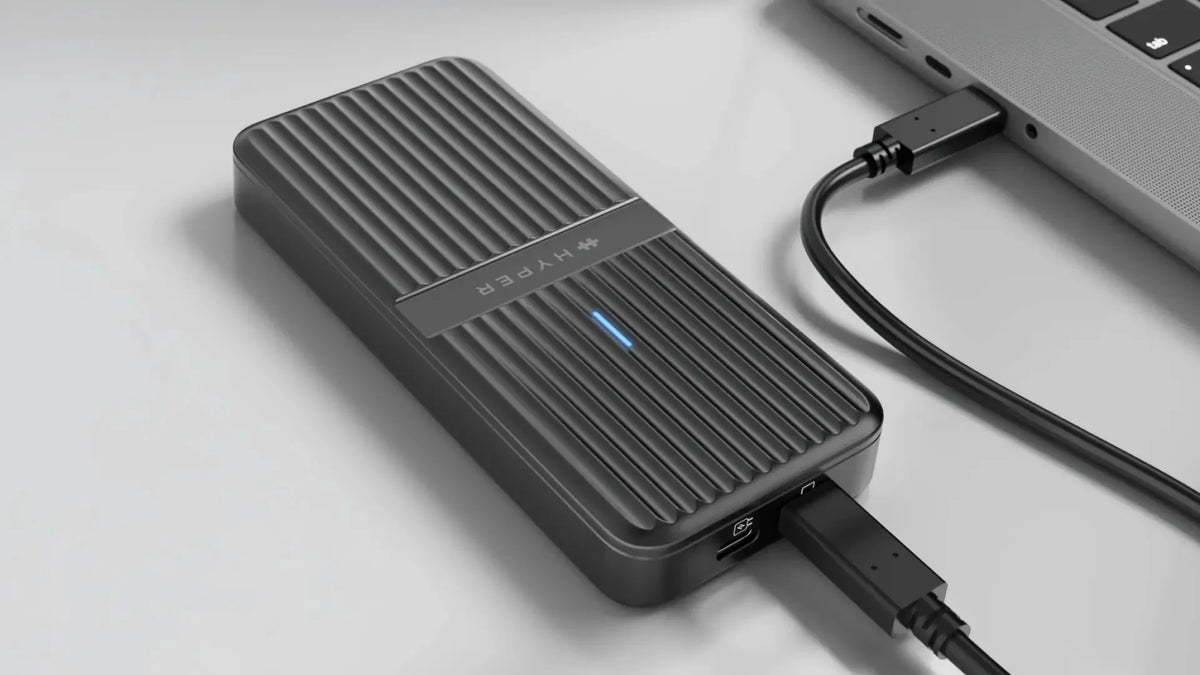
USB4 enclosures used to be a single category. That changed when USB4 v2 doubled the available bandwidth from 40Gbps to 80Gbps and added support for PCIe modules beyond storage. The result is a split market.
On one side, 40Gbps USB4 enclosures are the mainstream choice for fast portable storage. On the other, 80Gbps USB4 v2 enclosures are a different class of product, capable of running PCIe Gen 4 NVMe SSDs at full speed, supporting external AI accelerators, and pairing with the latest Thunderbolt 5 hosts.
Both have their place. The right answer depends on what you're doing with the enclosure and what you plan to plug into it. This guide breaks down what each tier is built for, how they compare on the specs that matter, and a clear framework for choosing between them. Hyper's two HyperDrive Next enclosures serve as the working examples throughout, since the lineup represents both tiers cleanly.
Meet the Lineup
Before going deep on use cases, here's the short version of what each enclosure is and who it's for.
HyperDrive Next USB4 NVMe SSD Enclosure (HD5001GL — $119.99)
The accessible, storage-focused option. 40Gbps USB4 connection. Built for fast, portable NVMe storage. PS5 compatible. Works across Mac, Windows, iPad, Chromebook, and Android. The right choice for most creators who need a quick, rugged external SSD without paying a premium.

HyperDrive Next USB4 M.2 PCIe Enclosure (HD2500GL — $199.99)
The premium, future-ready option. 80Gbps USB4 v2 and Thunderbolt 5 compatible. Supports PCIe Gen 4 NVMe storage, plus M.2 PCIe expansion modules like AI accelerators and networking cards. CES Innovation Awards 2026 Honoree. Built for professionals who need workstation-level performance or modular expansion.

The 40Gbps NVMe SSD Enclosure: What It's Built For
The HyperDrive Next 40Gbps NVMe SSD Enclosure is a storage-first product. It does one thing very well, and it does it for around $80 less than the 80Gbps option.
Photographers and RAW workflows. Sustained transfer speeds up to 3,800 MB/s mean a full day's shoot of 500 RAW images backs up in seconds. The IP55 silicone sleeve handles travel, location work, and environments that aren't kind to gear. Plug-and-play across Mac and Windows means no driver hassle when handing off files.
4K video editors. Editing directly off the enclosure is genuinely viable at 40Gbps. Project files, proxies, and timelines run smoothly without dropping back to slower external storage. Tool-free snap-in installation makes it easy to swap drives between projects.
PS5 game library expansion. This is one of the most overlooked use cases for USB4 enclosures, and one of the strongest reasons console owners choose this SKU. The HyperDrive Next 40Gbps is PS5 compatible, giving players a fast way to expand storage for installed games.
Cross-platform travelers and hybrid workers. Compatibility extends to Mac, Windows, iPad, Chromebook, and Android, which is broader than the 80Gbps version. The recycled aluminum body and silicone sleeve make it durable enough for daily transit. For multi-device workflows where storage is only one part of the setup, USB-C hubs for adding more ports can complement the enclosure by connecting displays, charging, networking, and everyday peripherals.

The honest limit: this enclosure is purpose-built for NVMe storage. It supports M.2 sizes 2230, 2240, 2260, and 2280, up to 4TB. If you need anything beyond fast portable storage, the 80Gbps unit is the better fit.
The 80Gbps M.2 PCIe Enclosure: What It's Built For
The HyperDrive Next 80Gbps M.2 PCIe Enclosure is a different category of product. The bandwidth jump matters, but the bigger story is what USB4 v2 unlocks beyond storage.
8K and high-bitrate video workflows. Full PCIe Gen 4 x4 throughput at up to 64Gbps means high-end NVMe SSDs run without throttling, even under sustained load. For editors working with multi-cam 8K, RAW video, or massive project files, the bandwidth headroom translates directly into shorter transfer times and smoother scrubbing.
Engineers and developers who need modular expansion. The enclosure supports PCIe-based M.2 modules, not just NVMe drives. That includes networking cards, capture cards, and other specialized PCIe hardware. For developers testing modular configurations or engineers running specialized workloads, this opens up workflows that storage-only enclosures can't touch.
Local AI inference on laptops. This is the biggest "wait, you can do that?" use case. The enclosure supports compatible M.2 AI accelerator modules like the Hailo-8 (26 TOPS) and Hailo-10H, letting you add edge AI compute to a laptop that doesn't have an internal M.2 slot or a discrete GPU. Edge AI runs inference locally instead of relying on cloud services, which matters for privacy-sensitive work, offline workflows, and reducing latency. For developers experimenting with local AI models or creators using AI-assisted tools, plugging an accelerator into a USB4 v2 enclosure is the most accessible way to add that capability without switching to a desktop.
Future-proofed Thunderbolt 5 setups. The enclosure is fully compatible with Thunderbolt 5, Thunderbolt 4, and USB4 hosts. As Thunderbolt 5 rolls out across more laptops in 2026 and beyond, including the latest MacBook Pro M5 Pro and M5 Max, the enclosure stays current rather than aging out.
Field and on-site work. IP55 protection with the included silicone sleeve, an aluminum body with a built-in thermal pad, and up to 25W of combined power (7.5W from the host port plus 18W via optional external USB-C) keep high-draw NVMe drives running reliably outside a controlled environment.

The trade-off: at $199.99, the 80Gbps unit costs more. It's also overkill if all you need is fast portable storage and you're not planning to use Thunderbolt 5, AI accelerators, or PCIe expansion modules.
Head-to-Head Comparison
| Feature | HD5001GL (40Gbps) |
HD2500GL (80Gbps) |
|---|---|---|
| Price | $119.99 | $199.99 |
| Bandwidth | USB4 40Gbps |
USB4 v2 80Gbps |
| Max transfer speed | Up to 3,800 MB/s | Up to 7,000 MB/s |
| Host Compatibility | Thunderbolt 5, 4 / USB4 v2 / USB4 / USB3 |
Thunderbolt 5, 4 / USB4 v2 / USB4 |
| PCIe modules supported | NVMe SSDs only | NVMe SSDs, AI accelerators, networking cards |
| Max storage | 4TB | 16TB |
| Power | Bus-powered | Bus-powered + optional 18W external PD power support |
| M.2 sizes | 2230 / 2240 / 2260 / 2280 | 2230 / 2242 / 2260 / 2280 |
| OS compatibility | Mac, Windows, iPad, Chromebook, Android |
Mac, Windows, iPad |
| Protection | IP55 with silicone sleeve | IP55 with silicone sleeve |
| Build | 100% recycled aluminum | 100% recycled aluminum |
| Best for | Portable storage, PS5, mobile creators |
Pro workflows, AI accelerators, future-proofing |
The three differences that actually drive a buying decision:
Speed. 80Gbps is double the raw bandwidth of 40Gbps, but the practical gain depends on your SSD. PCIe Gen 4 NVMe drives can saturate 80Gbps. If you're using a Gen 3 drive or a slower Gen 4, the 40Gbps enclosure may be enough.
Expansion capability. This is where the gap is widest. The 40Gbps enclosure is NVMe-only. The 80Gbps enclosure supports modular PCIe hardware including AI accelerators. If that matters to you at all, the choice is already made.
Price and longevity. The 40Gbps unit costs less today. The 80Gbps unit costs more but is compatible with Thunderbolt 5 hosts that are rolling out in 2026, which extends its useful life.
Which One Should You Choose?
The fastest way to decide is to match your workflow against the lists below.
Choose the HyperDrive Next 40Gbps NVMe SSD Enclosure if:
- You need fast portable storage for photo, 4K video, or general creative work
- You want PS5 storage expansion
- You work across Mac, Windows, iPad, Chromebook, or Android
- Your budget is closer to $120
- You're using PCIe Gen 3 or mid-range Gen 4 NVMe SSDs
- You don't need expansion beyond NVMe storage
Choose the HyperDrive Next 80Gbps M.2 PCIe Enclosure if:
- You edit 8K video or work with massive project files daily
- You're running high-end PCIe Gen 4 NVMe SSDs and want every drop of their performance
- You want to add an external AI accelerator (Hailo-8, Hailo-10H, or similar) to your laptop
- You have or are buying a Thunderbolt 5 host
- You need modular PCIe expansion beyond storage
- You want to future-proof for the next several years
Still not sure? The 40Gbps unit covers about 85% of real-world creative storage needs at a much lower price. The 80Gbps unit is the right call when you know you need more than storage, when you're investing in a Thunderbolt 5 setup, or when external AI compute is on your roadmap. Explore our ssd enclosures collection to learn more.


Best Thunderbolt 5 Dock for Gaming Laptop Setups
Back-to-School Tech Essentials for Students
Share: