


The Best External SSD Storage Solution
While photographers and graphic designers have had the ability to work directly from external storage devices for some time now, our HyperDrive SSD enclosure allows them to work with large, 4TB NVMe drives that are easily exchangeable without tools. Videographers have taken advantage of the enclosure’s incredible USB4 data transfer speeds. The world’s fastest NVMe SSD enclosure allows quick, portable access to enormous ProRes Log files and work with the files directly from their NVMe SSD.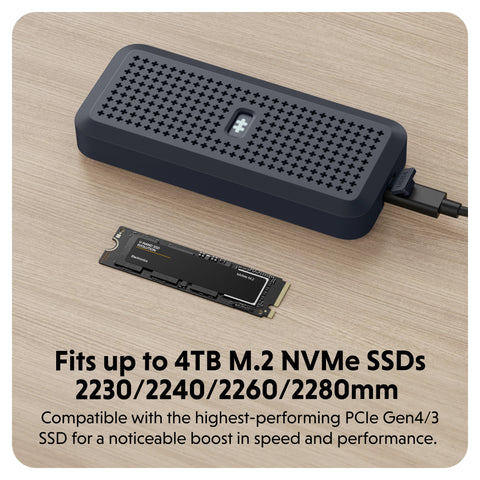
Gamers* and hybrid workers also love the portability of the HyperDrive Next USB4 NVMe SSD Enclosure. The EcoSmart™ 100% recycled aluminum casing is IP55 water and dust resistant while using the silicon protective sleeve. This level of protection empowers users to take their data with them from their home, to the office, to the tournament and not need to worry about their data being lost or corrupted.
*Compatible only with PlayStation 5 and PC

Expert Analysis
Industry professionals and journalists who were able to get the SSD enclosure have been agreeing on the sturdy construction, unbeatable performance, and compact convenience of the NVMe SSD reader. When MacRumors had a chance to test the enclosure they were amazed at its speed. “I was able to copy a ~28 GB folder with roughly 17,500 items in it to the drive in around 15 seconds.” Said Erik Slivka in his review.
Youtuber Kyle Erickson talked about the HyperDrive USB4 SSD Enclosure’s role in his daily desktop setup. “I run pretty much my entire workflow from that external drive sitting in the HYPER USB4 Enclosure... There’s no perceivable difference between the speed of this drive and the internal one.”
When the product designer, engineer and advisor Ben Rabicoff tested the SSD NVMe enclosure by transferring 305+ Gb of data, its blazing fast 40Gbps speeds completed the task in less than 3 minutes – over 9 minutes faster than a standard SSD external hard drive.

EcoSmart™ USB-C Connectivity for Earth Day and Beyond
Boost Your Productivity: Learn How to Turn Your iPad into a Powerful Workstation
Share: