

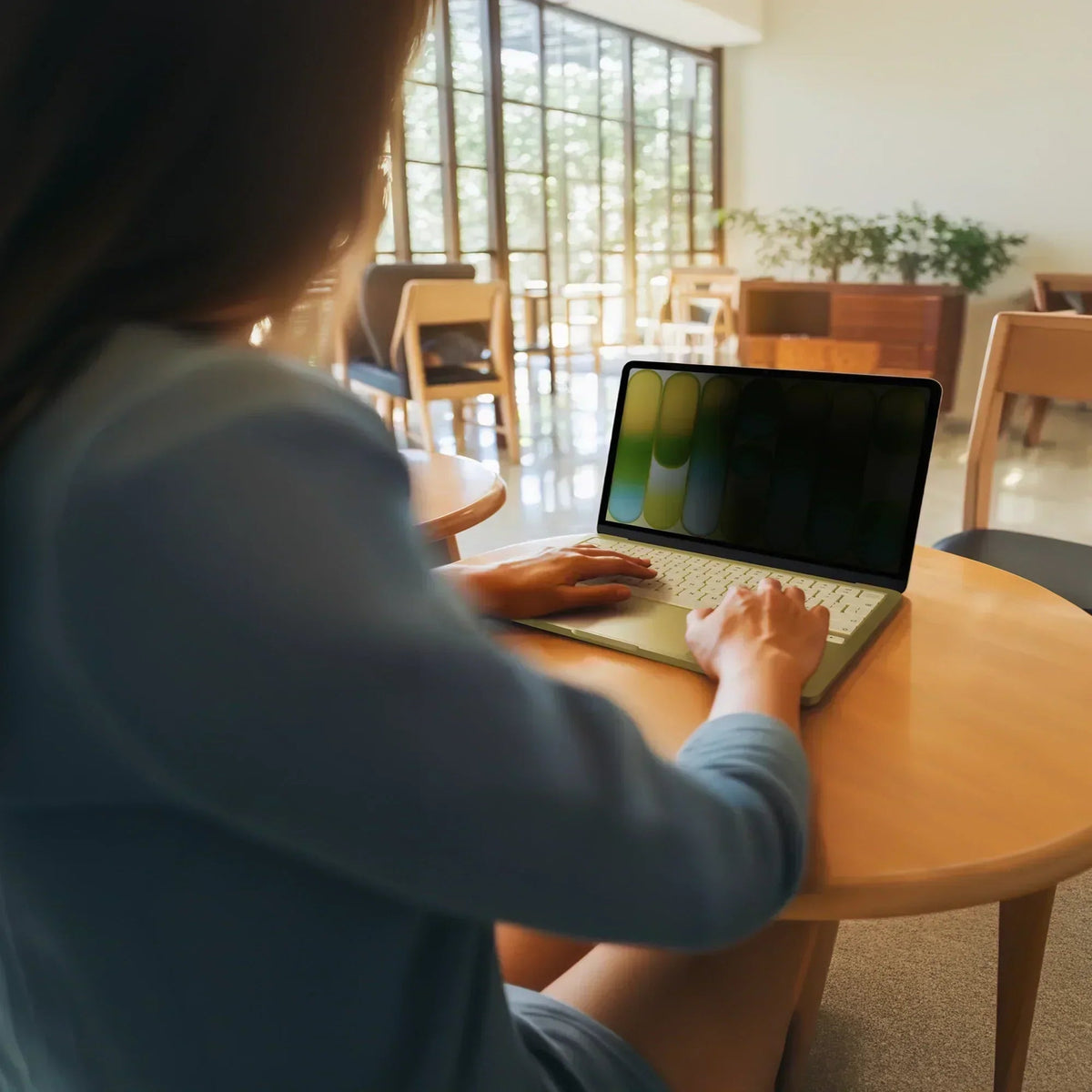
Working in public means working on display. Airports, cafes, conference centers, coworking spaces, hotel lobbies, and trains all put your screen within easy view of anyone nearby. For anyone handling sensitive work, knowing how to keep a MacBook screen private in public is an important part of working securely.
The HyperShield Magnetic Privacy Screen for MacBook Neo 13" gives you a simple way to protect your screen wherever you work. This MacBook Neo privacy screen snaps on when you need it and comes off when you don’t, giving you privacy without permanently changing your display.
Here is how it works.
Why screen privacy matters for MacBook users in public spaces
Privacy matters most in places where people are working close together: airline seats, where passengers behind you may have a clear view of your screen; cafe tables, where someone sitting next to you can easily see your display; and open-plan offices and coworking spaces, where confidential information can be exposed simply because someone is looking over your shoulder.
What a 30° viewing angle means
The HyperShield MacBook privacy screen is engineered to a 30° viewing angle. Your content stays visible to the person directly in front of the display. Move just a few degrees off-axis in either direction, and the screen darkens to the point of being unreadable.
For anyone looking for a laptop privacy screen for public spaces, the goal is simple: keep your work visible to you while making it difficult for people beside you to see it.
Why removable magnetic attachment matters
Traditional privacy screens can be a permanent commitment. Once attached to your display, removing them can mean peeling adhesive, dealing with bubbles, or risking damage to the surface underneath.
The HyperShield uses integrated magnetic strips instead. The screen aligns automatically and snaps securely into place, then comes off just as easily. No adhesive, no residue, and no surface damage.
That makes it a removable MacBook privacy screen you can use when you need privacy and remove when you want your full viewing angle back.
So, do magnetic privacy screens work on MacBook? Yes. The magnetic design allows the HyperShield to attach securely while remaining easy to remove when privacy is no longer needed.
Visibility and comfort: glare, brightness, matte/glossy, and blue light
Privacy filters can reduce screen brightness. Adding a film over your display can result in a dimmer image and more eye strain, especially in bright environments.
This anti glare privacy screen for MacBook keeps your display 12% brighter than leading alternatives, based on internal testing. Its anti-reflective coating also helps reduce glare from overhead lighting and sunlight in cafes, airports, and other public spaces.
The screen is also reversible, giving you two viewing options. The matte side reduces glare and fingerprints, while the glossy side provides a sharper, more vibrant image. If you are comparing matte vs glossy privacy screen options, simply flip the privacy screen to match your environment and preference.
Together, these features make for a more comfortable viewing experience. The privacy screen also reduces harsh blue light emissions, helping reduce visual discomfort during long screen sessions while supporting focus, productivity, and better sleep.
Your screen stays easier to read in the environments where privacy matters most.
Everyday MacBook usability: camera, closure, scratches, and antimicrobial protection
A good MacBook privacy screen should protect your screen without getting in the way of the features you use every day.
The HyperShield MacBook Privacy Screen has a precision cutout that keeps the FaceTime camera fully exposed, so video calls work normally. This answers another common question: does a MacBook privacy screen block the camera? With the HyperShield, the camera remains unobstructed.
Its slim design also lets your MacBook close completely and enter sleep mode normally, helping prevent unnecessary overnight battery drain. If you are wondering, can you close a MacBook with a privacy screen on? The HyperShield is designed to allow the MacBook to close fully while the screen is attached.
It features a 3H scratch-resistant coating designed to handle the everyday wear that comes with carrying, opening, and closing your MacBook throughout the day.
DefenseGuard antimicrobial protection is built directly into the material, helping keep the surface cleaner over time. Unlike sprays or surface treatments that can wear away, the antimicrobial protection is an additive in the material and lasts for the life of the product.
A privacy screen for coworking spaces, cafes, and more
Visual privacy is the kind of risk that rarely announces itself. The person reading your screen on a plane will not tell you. A colleague who sees a confidential number from across an open-plan office may never mention it.
That is why a privacy screen for coworking spaces, cafes, airports, and other public environments can be a simple addition to your mobile workspace.
The HyperShield magnetic privacy screen for MacBook gives you side-on privacy without changing how you use your laptop. Snap it on when you need protection, remove it when you do not, and keep working wherever you are.
Ready to protect your screen? Shop the MacBook Neo privacy screen and options for other MacBook models here.
Leased an iPad with Apple Upgrade? Turn It Into a Powerful Workstation
Hyper Brings its Latest Range of Power, Connectivity and MacBook Accessories to IFA 2026
Share: