

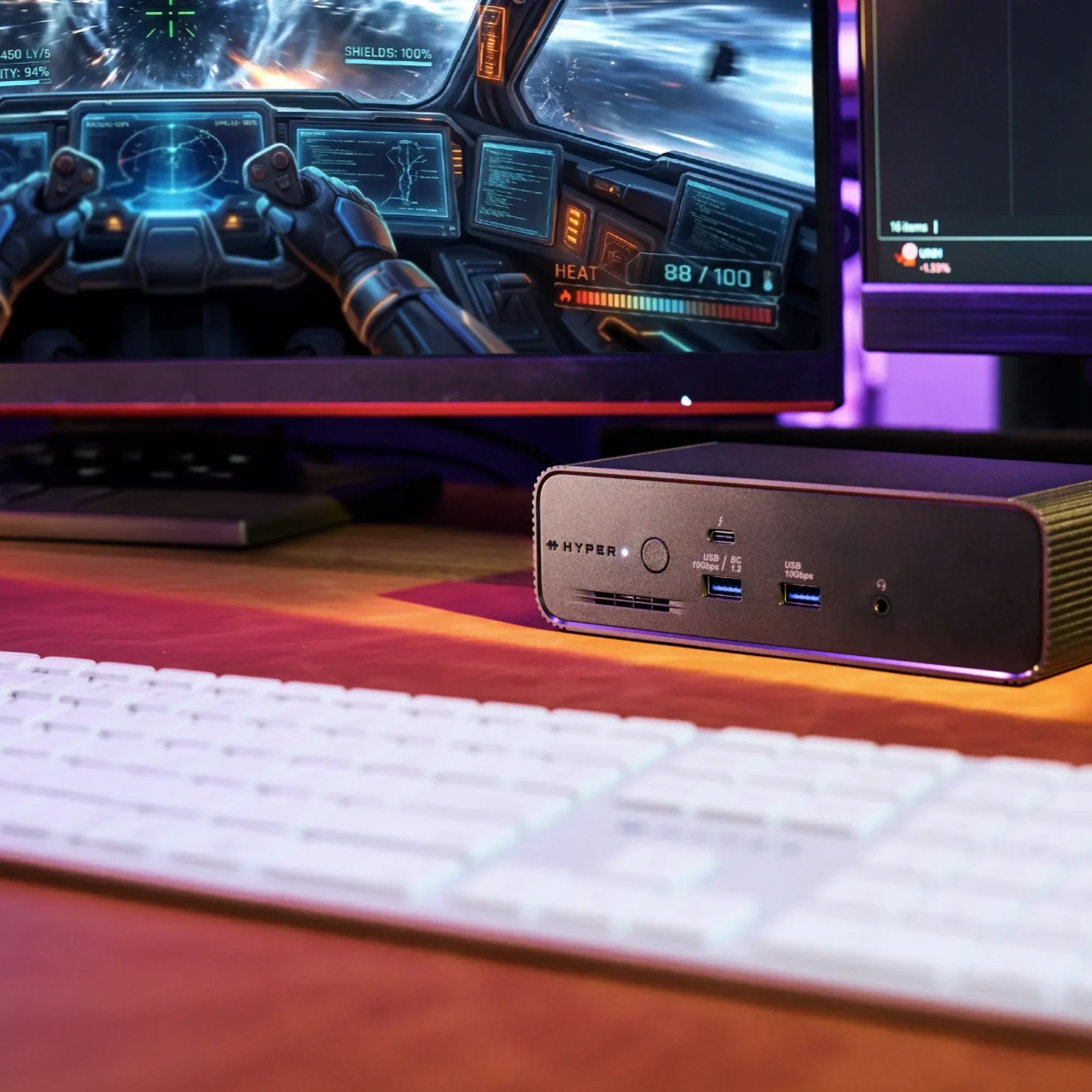
A Thunderbolt 5 dock does more for a gaming laptop than any other single accessory. One cable replaces a tangle of display adapters, USB hubs, and Ethernet dongles. It charges your laptop at full speed while you play. It gives you fast wired internet, external NVMe storage for your game library, and up to three monitors, all through the same port you are already using to charge.

This post covers what the HyperDrive Next Thunderbolt 5 Dock does for gaming laptops specifically: which machines it works with, what it unlocks for displays and storage, and why the bandwidth difference between Thunderbolt 5 and older docks matters when you are actually playing.
What gaming laptops have Thunderbolt 5?
Thunderbolt 5 is currently available on select Intel Core Ultra (Arrow Lake HX) gaming laptops and on the latest Apple Silicon MacBook Pro models. Not every high-end gaming laptop includes it. It requires either a discrete TB5 controller on the Intel side or one of Apple's higher-tier pro chips.
You'll typically find Thunderbolt 5 on:
- Flagship 16" and 18" gaming laptops running Intel Arrow Lake HX processors
- Premium thin-and-light gaming laptops built on Intel Core Ultra
- Mobile workstations aimed at creators and engineers
- High-performance Apple Silicon laptops with native TB5 controllers built into the chip
Not every high-end gaming laptop includes Thunderbolt 5, even at premium price points. It depends on the specific processor and controller inside. Always check your laptop's spec sheet for the Thunderbolt 5 logo or listing before buying a TB5 dock.
If your laptop has Thunderbolt 4, a TB5 dock will still work. You get TB4 bandwidth (40Gbps), and the dock is fully backward compatible. The TB5 performance gains only activate when your laptop also has a TB5 port.
One cable, full gaming setup
The HyperDrive Next Thunderbolt 5 Dock connects to your laptop through a single Thunderbolt 5 cable and turns that one port into a complete desk setup. For gaming, that means:
- Up to three 4K displays at up to 144Hz on compatible Windows TB5 laptops, or 60Hz on MacBook Pro M5 Pro/Max
- 2.5Gbps Ethernet for wired multiplayer without Wi-Fi
- M.2 PCIe Gen 4 slot for a fast NVMe game library drive
- 140W EPR PD 3.1 charging, enough to power a high-wattage gaming laptop at full load
- 10Gbps USB ports for controllers, headsets, capture cards, and peripherals
- Thunderbolt Share to connect two machines to one dock
One cable in. Everything works.
Displays: triple 4K at up to 144Hz through one Thunderbolt port
The biggest display upgrade Thunderbolt 5 brings to gaming is bandwidth. Thunderbolt 4 tops out at 40Gbps total. Running a single 4K display at high refresh rates, charging the laptop, and transferring data at the same time pushes that ceiling fast.
Thunderbolt 5 doubles the baseline to 80Gbps and pushes to 120Gbps with Bandwidth Boost when display output demands it. That headroom is what makes triple 4K at up to 144Hz possible through one cable, depending on your host machine.
What you can run through the HyperDrive Next Thunderbolt 5 Dock:
- Three 4K displays at up to 144Hz on compatible Windows Thunderbolt 5 laptops
- Three 4K displays at 60Hz on MacBook Pro M5 Pro and M5 Max
- A single 8K display at 144Hz

Display output depends on your host laptop's specifications, including its Thunderbolt version, chip, and supported display configurations. Triple 4K at up to 144Hz requires a compatible Windows Thunderbolt 5 laptop. Triple 4K at 60Hz is supported on MacBook Pro M5 Pro/Max. Results may vary.
For gaming, the triple 4K configuration is the relevant one. A primary game monitor flanked by two secondary screens for chat, stream monitoring, maps, or system stats. All running natively, no compression, no software driver.
MacBook Pro M5 Pro and M5 Max are worth calling out specifically. M5 Pro was the first MacBook Pro chip to support three external displays over a single Thunderbolt port. If you game on a MacBook Pro M5 Pro or M5 Max, the HyperDrive Next Thunderbolt 5 Dock gives you the full triple-display rig through one cable.
Game storage: why the M.2 slot changes load times
The HyperDrive Next Thunderbolt 5 Dock includes a full-size M.2 PCIe Gen 4 slot. You install a fast NVMe SSD directly in the dock. The drive is accessible to your laptop through the Thunderbolt 5 connection.

PCIe Gen 4 NVMe drives hit sequential read speeds of 5,000 to 7,000 MB/s. Over a Thunderbolt 5 connection with 80Gbps of data bandwidth, that speed is genuinely available to your system. Over Thunderbolt 4 at 40Gbps, you were giving up roughly half of your drive's potential throughput.
In practical terms: large open-world games like Cyberpunk 2077 and Baldur's Gate 3 load noticeably faster from a Gen 4 NVMe than from a Gen 3 drive or an older external SSD. Keep your active game library on the M.2 drive in the dock. Connect one cable when you sit down. Your game library is there at full speed.
The M.2 slot in the HyperDrive Next Thunderbolt 5 Dock also supports compatible PCIe-based AI accelerator modules, not just storage drives. As AI-assisted gaming tools develop (real-time NPC behavior, frame generation, local inference for adaptive difficulty), the slot is already built to handle them.
Wired Ethernet: does it reduce ping for competitive gaming?
Yes. Wired Ethernet consistently delivers lower and more stable latency than Wi-Fi, regardless of your router or signal strength. For competitive games where input timing matters (shooters, fighting games, MOBAs, battle royales), wired beats wireless.
The HyperDrive Next Thunderbolt 5 Dock includes 2.5Gbps Ethernet. That matters in two situations specifically: downloading large game updates and patches and connecting to a NAS or local game server.

For online multiplayer, the bottleneck is almost always your internet connection rather than the Ethernet port speed, so 1Gbps and 2.5Gbps deliver similar ping to external servers. Where 2.5GbE pulls ahead is local network access. If you store your game library on a NAS, 2.5GbE gives you up to 312 MB/s local transfer versus 125 MB/s on Gigabit. Moving a 100GB game from your NAS to your system takes under six minutes on 2.5GbE. It takes over thirteen on Gigabit.
The other benefit is stability. A wired Ethernet connection through the dock does not drop during background Wi-Fi interference, does not compete with other devices on the 5GHz band, and does not add variable latency from wireless protocol overhead. If you play competitively, plug in.
Charging: 140W keeps your gaming laptop running at full power
Gaming laptops draw significantly more power under load than standard laptops. A MacBook Pro M5 Max at full load, or a high-wattage Intel gaming laptop running a demanding title, can pull well above 100W. A dock that only provides 100W will cause the battery to slowly drain during heavy gameplay even while connected.

The HyperDrive Next Thunderbolt 5 Dock charges at 140W EPR PD 3.1 through the same cable that carries your displays and data. For most gaming laptops, 140W is enough to sustain full performance without touching battery reserves. You play, the laptop stays charged, the cable does not change.
Thunderbolt Share: two machines, one gaming desk
Thunderbolt Share lets you connect two computers to the same dock and share files, a keyboard, a mouse, and peripherals between them without a network or extra hardware.
For gamers, the practical use case is a gaming machine and a second system on the same desk: a streaming PC or a work laptop that shares the same monitor, keyboard, and controller setup. You switch between machines by changing the active input on your displays, not by plugging and unplugging cables.

File transfer between machines through Thunderbolt Share is fast and direct. Moving a large game save, a video clip from a gaming session, or a build between systems takes seconds, not minutes.
Who the HyperDrive Next Thunderbolt 5 Dock is for
Competitive PC gamers on Intel TB5 laptops:
One cable replaces every adapter on your desk. Wired 2.5GbE Ethernet, fast M.2 game storage, 140W charging, and up to three 4K displays at up to 144Hz through a single connection.
MacBook Pro M5 Pro and M5 Max gamers:
AAA titles including Baldur's Gate 3, Cyberpunk 2077, No Man's Sky, and Resident Evil Village run natively on macOS. The M5 Pro and M5 Max handle them well. The HyperDrive Next Thunderbolt 5 Dock gives MacBook Pro M5 Pro/Max users a full triple-display gaming setup through one cable.
Streamers with a two-machine setup:
Thunderbolt Share connects a gaming machine and a streaming PC to the same dock, sharing peripherals and enabling fast local file transfer without a switch or network.
Anyone upgrading from a Thunderbolt 4 dock:
If you have a TB5 laptop and a TB4 dock, you are leaving bandwidth on the table. The jump to TB5 is most noticeable in display performance and external storage speed, exactly the two things that matter most in a gaming setup.

Thunderbolt 5 support on gaming laptops in 2026 is still limited to a specific tier of hardware. If your laptop is a current-generation Intel flagship with a discrete TB5 controller, or one of Apple's latest pro-tier chips, you can take full advantage of TB5's 80Gbps bandwidth, 120Gbps Bandwidth Boost, and 240W power delivery. For everyone else running Thunderbolt 4, a Thunderbolt 5 dock remains a smart future-proof investment. It works today at full TB4 speeds and unlocks the next level of performance the moment you upgrade. When choosing a TB5 dock for a gaming laptop, prioritize one with sufficient power delivery, multiple display outputs, and a fast PCIe lane for external SSDs and eGPUs.


Why IT Teams Should Standardize on Safety-Tested Chargers
USB4 vs USB4 v2 SSD Enclosure: Which Should You Buy in 2026?
Share: